
Yes, you can try Seedream free through platform-specific allowances. EaseMate advertises a first Seedream 4.5 generation or edit without signup, while Mage gives new members a one-time balance of 300 Gems for trying Seedream 5.5. Your image count depends on the version, output size and reference images you choose. EaseMate trial, Mage trial and image costs.
Prices and trial conditions were checked on November 12, 2026 against the provider pages linked below. Image counts and dollar conversions are calculations from published offers. Account eligibility and the quote shown before generation determine what you can actually use.
Key Takeaways
- Choose the version first. Seedream 4.0, 4.5, 5.0 Lite, 5.0 Pro and 5.5 have separate entries and billing rules. Our Seedream model guide explains the family.
- A trial balance has a finite image count. Mage’s 300 Gems cover 12 whole text-only 1K images or seven 2K images at its published rates, assuming the balance is unspent. Mage pricing.
- Compare the complete request. Match the output size, number of outputs and reference inputs before comparing prices. The price table below uses one text-only 2K output.
- Read unlimited-plan conditions. Queue speed, supported settings, benefit expiry and subscription requirements affect how much work the plan covers. Mage terms, Dreamina launch offer.
- Seedream 5.5 is available in ChatCut. Its generated images can continue into a video project. The ChatCut section below explains how to check trial eligibility and credit costs. Seedream 5.5 in ChatCut.
Seedream free access by version
For a search such as “Seedream AI free,” start by checking the exact model name on the generator. These public offers cover different versions, and each provider sets its own allowance.
| Version you want | Published free route | Allowance established by the public page | What to check before generating |
|---|---|---|---|
| Seedream 4.0 | PicLumen advertises free generation and editing | A fixed daily image count is unverified | The selected model, available balance and request cost. PicLumen |
| Seedream 4.5 | EaseMate advertises a first free generation or edit without signup | One initial opportunity, with further access through check-ins, referrals or a subscription | The cost shown after choosing the model and settings. EaseMate |
| Seedream 5.0 | JXP labels its family-page generator, using 5.0 Pro, “Free Trial” | A fixed free image count is unverified | Whether you selected 5.0 Lite or Pro and how many credits the trial grants. JXP |
| Seedream 5.5 | Mage publishes a model-specific signup allowance | 300 Gems once, with 24 Gems per 1K image or 42 per 2K image | Reference inputs add cost. See the next table for other trials. Mage |
How to use Seedream 4.0 free
Open PicLumen’s Seedream 4.0 page, follow its generator link and select Seedream 4.0. Check the allowance and cost shown for one output before submitting. PicLumen’s public page advertises free access without giving a fixed daily count. PicLumen model page.
Another search result, MixHub, uses “free” in its Seedream 4.0 copy while its visible form quotes five credits. Establish the available trial balance before budgeting outputs there. MixHub generator.
How to use Seedream 4.5 free
EaseMate’s FAQ offers a first generation or edit without signup. Choose the text-to-image or image-editing workflow, confirm Seedream 4.5 and review the cost for your selected settings. Further usage depends on its check-in, referral or subscription options. EaseMate trial terms.
RunComfy also has “Free” in its Seedream 4.5 Edit title and publishes a rate of $0.032 per image beside the generator. Its page establishes a paid rate, while a model-specific free balance remains unverified. RunComfy model page.
How to use Seedream 5.0 free
On JXP, the family-page generator uses 5.0 Pro and displays a Free Trial label. Review the account’s actual grant before submitting. Morph Studio also has a free-titled 5.0 page that discusses both Lite and Pro, so confirm the variant in the generator and the allowance available to your account. Neither cited landing page establishes a fixed free image count. JXP, Morph Studio.
If you are deciding whether to spend the trial on the latest version, our Seedream 5.5 versus 5.0 Pro guide covers the upgrade decision.
Seedream free trials for 5.5
The following counts assume one text-only output per attempt and a completely unspent trial balance. Conditional rows require confirmation that the trial can access Seedream 5.5. All offers were rechecked on November 12, 2026.
| Platform | Published free allowance | Calculated Seedream 5.5 coverage | Eligibility or limit |
|---|---|---|---|
| Mage | 300 Gems once | 12 whole 1K images or seven 2K images | New members, before reference-input charges. Model guide |
| Kie.ai | 80 testing credits | 12 whole 2K images, if eligible | The grant is platform-wide. Confirm 5.5 eligibility. Signup allowance, 6.3-credit rate |
| WaveSpeed | $1 for eligible new accounts, no card required | 28 whole 2K images at the $0.035 reference rate, if eligible | Some premium models are excluded from trials. Trial terms, model rate |
| Flux1 AI | 10 signup credits | One text-only 2K image, if the grant applies | Each reference adds one credit. Free allowance, model costs |
| OpenArt | 40 signup credits | Image count unverified | The public model page gives the grant without a matching 2K credit quote. Model FAQ |
| Krea | Free plan lists 100 units/day for basic features | Free 5.5 access unverified | The same page lists all-image-model access under Basic. Model and plan page |
| Artlist | Image trial specifies two Nano Banana 2 Lite images, plus a separate Studio balance | Seedream 5.5 allocation unverified | Check the model eligibility of the Studio balance. Trial details |
For a quick test, select the model, request one image and read the generation quote. After it finishes, compare the credit balance before and after. That gives you the charge for your actual request, including any selected extras.
Seedream pricing across 13 platforms
For Seedream 5.5, four API providers publish text-only 2K quotes between $0.030 and $0.035 per image in the table below. BytePlus advertises an official starting price of $0.02 per image without tying that figure to a verified 2K rate. BytePlus starting price.
Comparison method. One provider-labelled 2K output, zero reference images and published USD prices, checked 2026-11-12. Taxes, currency-conversion fees and optional processing extras are excluded. Credit conversions use credits per image × payment ÷ credits purchased. Subscription conversions assume the full allowance is used on these images. For an output comparison, also match the exact pixel dimensions and prompt across providers.
| Platform | Published billing basis or payment commitment | Approx. USD per text-only 2K image | Checked |
|---|---|---|---|
| BytePlus | From $0.02/image, plus separate introductory packages | 2K rate unverified. Official pricing | 2026-11-12 |
| reAPI | 30 credits, $0.001/credit, prepaid usage | $0.030. Current model page | 2026-11-12 |
| Elyum | Current displayed rate, with a $0.06 list price crossed out | $0.0311. Current model page | 2026-11-12 |
| Kie.ai | 6.3 credits at $0.005/credit, excluding top-up bonuses | $0.0315. Pricing table | 2026-11-12 |
| WaveSpeed | Published 2K documentation rate, subject to the final task charge | $0.035 reference rate. Model pricing | 2026-11-12 |
| Mage | 42 Gems per 2K image, $10 for 10,000 Gems. Pro unlimited route starts at $30/month | $0.042 on the stated Gem pack. Unlimited cost is monthly payment ÷ actual outputs. Image rate, packs and plans | 2026-11-12 |
| Higgsfield | 3.5 credits. Its guide uses a $49/1,000-credit plan example | $0.1715, about $0.17, at that example rate. Provider guide | 2026-11-12 |
| Flux1 AI | 10 credits. Basic is $16.90/month for 300 credits | $0.563 on Basic monthly, or about $0.397 at the annual rate with $142.80 paid upfront. Image credits, plan prices | 2026-11-12 |
| Dreamina | Launch offer lists Standard monthly at $21.60 with a 30-day 5.5 benefit | 2K coverage and per-image cost unverified. Offer terms | 2026-11-12 |
| OpenArt | Credit plans with a 5.5 discount on Pro/Wonder | Unverified. A matching public 2K credit cost is needed. Plans | 2026-11-12 |
| Krea | Basic shows $9/month and all-image-model access | Unverified. The page gives no 5.5 units-per-2K figure. Plans and model | 2026-11-12 |
| Artlist | 75 credits per 2K image | USD conversion unverified. A current plan payment and matching allowance are needed. Credit schedule | 2026-11-12 |
| ChatCut | Available in the editor. Select Seedream 5.5 in the model menu and review account eligibility and the quote for your chosen settings | Check available sizes and the displayed credit cost before generating; a verified 2K credit rate and USD conversion are not available here. Model page | 2026-11-12 |
The Higgsfield dollar amount comes from its guide’s example plan, whose own price-check date is November 10. We re-read that guide on November 12. WaveSpeed labels its documentation as a reference and says the final task charge prevails. Check the account quote when either condition affects your purchase. Higgsfield calculation basis, WaveSpeed billing note.
What is the official Seedream API price?
BytePlus’s Seedream page advertises generation and editing from $0.02/image. A resolution-specific official 5.5 rate could not be established from that page or the public ModelArk pricing content retrieved for this check. The table therefore leaves the official 2K rate unverified. BytePlus product page, ModelArk pricing.
The official introductory-package page also lists image quotas and a 30-day validity. Its public price widgets returned “Loading pricing” during our check. Confirm the rendered payment, supported resolution and API eligibility in your account before comparing a package average with a metered API quote. BytePlus package page.
What paid unlimited Seedream plans include
Mage unlimited
Mage lists Seedream 5.5 unlimited generation for Pro, Pro Plus and Max, including output up to 2K. Pro has a $30/month USD base price. Unlimited requests use the standard queue, while Fast mode spends Gems. The membership page retrieved for this check displayed HKD checkout alongside its USD base prices. Model announcement, queue rules, membership pricing.
Dreamina’s launch benefit
Dreamina’s November 9–16, 2026 campaign grants 30 days of unlimited Seedream 5.5 to eligible subscriptions. Its listed promotional prices include $21.60 for Standard monthly and $100.79 upfront for Basic annual. The 5.5 benefit lasts 30 days on either billing cycle. Account, region and supported resolutions affect eligibility. Campaign prices and validity.
The benefit uses supported Dreamina Web AI Image/Canvas workflows, a standard queue and one active task at a time, with hourly and daily controls. It requires the qualifying membership and auto-renewal agreement to remain active. Basic monthly is excluded, along with App, Agent, MCP, CLI, plugin and script access. Campaign conditions.
OpenArt’s unlimited policy applies to selected models and promotion periods, with slower queues possible for high activity and MCP/CLI access excluded. Its advertised 5.5 discount establishes a discount, while unlimited 2K eligibility still needs confirmation. OpenArt plan FAQ.
How edits and retries change the Seedream price
A reference-based edit may add an input charge to the output price. These are the rechecked 2K, one-output, one-reference figures using the same payment assumptions as the main table.
| Provider | Reference billing | Approx. total for one 2K edit |
|---|---|---|
| reAPI | Current model page directly quotes the combined request | $0.037. Source |
| Elyum | $0.0071 per reference | $0.0382. Source |
| Kie.ai | 1.44 extra credits, or $0.0072, per reference | $0.0387. Source |
| WaveSpeed | $0.008 per reference | $0.043 reference rate. Source |
| Higgsfield | One reference keeps the quoted 3.5-credit rate | $0.1715 at its guide’s example plan rate. Source |
| Flux1 AI | One extra credit per reference | About $0.620 on Basic monthly. Image rate, plan |
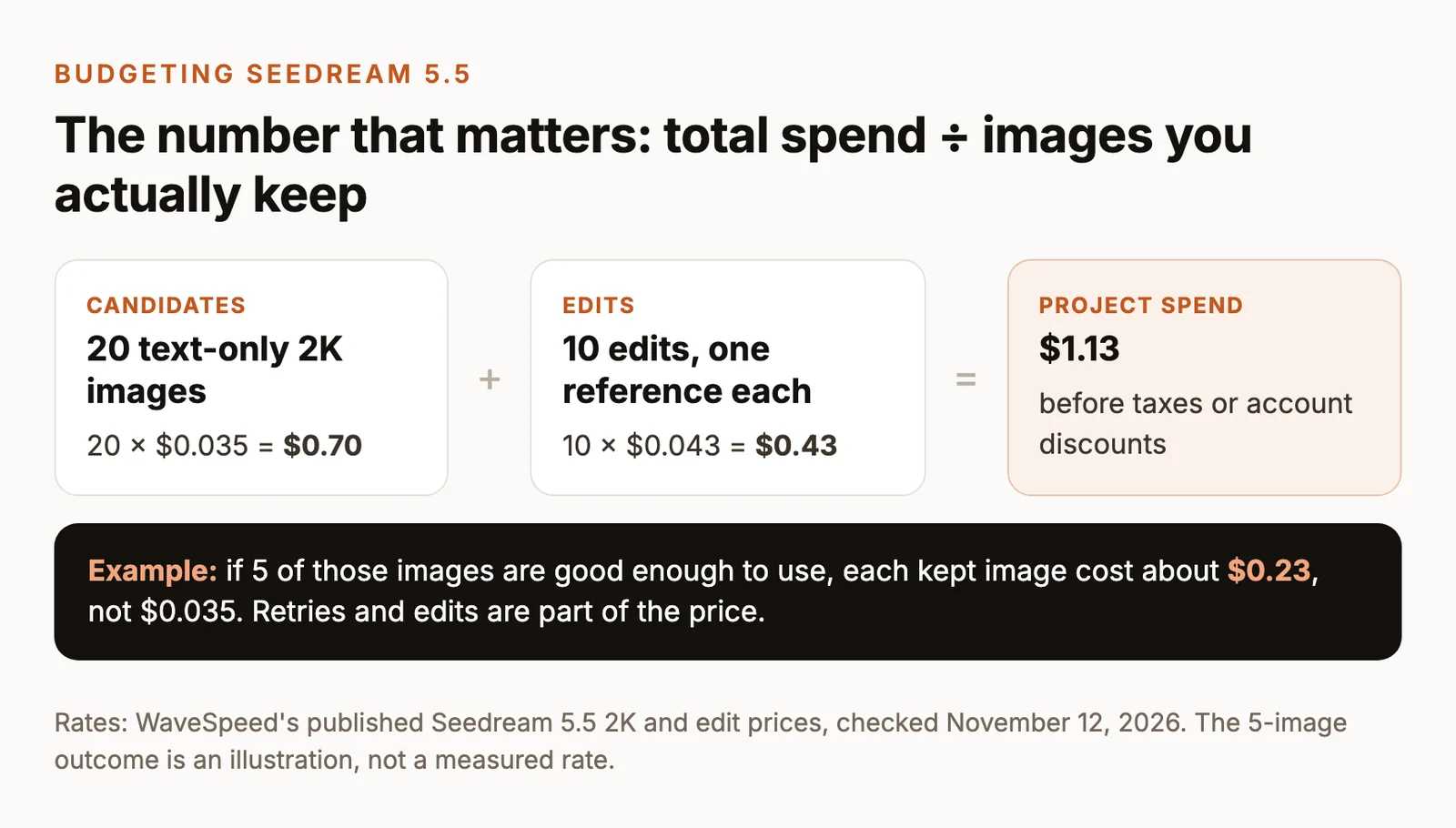
For a small project, WaveSpeed’s published reference rates give this budget calculation. Twenty text-only 2K candidates cost 20 × $0.035 = $0.70. Ten further edits with one reference each add 10 × $0.043 = $0.43, bringing the total to $1.13 before taxes or account discounts. Generation rate, edit rate.
Track total generation spend ÷ usable images kept, together with the upfront payment. That accounts for the attempts needed to reach your final selections.
Use the free trial on one image and one edit
Use the same prompt and settings across any providers you test. The two image briefs below were planned for 1K, 16:9, one output and background auto; the displayed examples were generated with GPT Image 2.6, and the P1 image has a taller frame than the planned ratio. These examples illustrate the prompts rather than Seedream 5.5 output quality or ChatCut settings. The pricing tables above use the separately specified 2K requests.
For ChatCut, confirm the available controls before generating. Pick Seedream 5.5 in the model menu, then review the available size, aspect ratio, background options and credit quote before submitting.
P1. Generate a product hero
P2. Make one reference-based edit
Use the P1 output as the only reference and keep the output settings identical.

In the GPT Image 2.6 edit example, the bottle body and cap are forest green and retain the rounded profile, textured surface and rightward shadow, but the wider frame changes the bottle’s scale within the composition and the visible stone ledge; Seedream 5.5 result to be added.
Record the model identifier, exact pixel dimensions, output count, reference count, balance before and after, queue time and whether you kept each result. For a provider comparison, run the identical P1 prompt at matching dimensions. For P2, supply the same P1 source file to every provider. Compare the complete images before drawing a conclusion.
Our Seedream 5.5 prompt guide provides more briefs to try with the remaining allowance.
Seedream 5.5 in ChatCut and the cost of the next step
Seedream 5.5 is available in ChatCut, where generated images enter a project and can be placed on the timeline. You can work in the web editor, desktop app or connected Agent workflow. The Seedream 5.5 getting-started guide covers the model workflow.
| ChatCut cost question | Detail to confirm |
|---|---|
| What is the free allowance? | Check your account for a trial balance, its expiry and whether it covers Seedream 5.5 with your current plan before generating. |
| How many credits does each image use? | Read the quote for the selected model, output settings and reference inputs before submitting; check the billing terms for retries and failed requests. |
| How many free images does that cover? | If your trial balance is eligible, divide the usable credits by the displayed cost for the same settings and round down; edits or different settings may change that count. |
Once you have a still you want to keep, use it as the first frame for Kling 4.0 or Seedance 2.5, then add captions, voiceover and music on the timeline. Budget the video request separately. Select the video model and settings, then review any plan requirement and the displayed credit quote before submitting. Our image-to-video guide and AI video prompts cover that next shot.
If your brief needs a different image model, GPT Image 2.6 is also available in ChatCut. Compare the creative tasks in our Seedream, Nano Banana and GPT Image guide or the wider AI image generator comparison. For another model’s free-access options, see Free GPT Image 2.